Nope. Sadly doesn’t give an option either through the phone or the watch. Ah well. 
1 Like
My Daughter said it was a setting on the watch to mirror the phone wallet.
My Daughter said for some items, when adding them to the phone it asks if you want them on the watch as well. My Daughter indicated it isn’t always a smooth process, or an intuitive one.
2 Likes
That’s already selected. Power cycled both devices and they don’t sync across. Only options on the watch version of Wallet are for Apple Card, credit/debit cards (won’t recognise loyalty card numbers entered) or transit cards selected on menu of participating companies. Thanks to you and your daughter though!  Maybe it’s just my version of watch.
1 Like
Perhaps turning mirroring off and then power cycle off and on. Then turn mirror on again?
I asked if she had Woolies Rewards on it as well and she said she does. I didn’t ask the version of the watch but she does have the latest firmware on it.
1 Like
All software up to date and have tried the power cycling including as per the order suggested on Apple forums. Other apps etc all sync across it’s just the Wallet cards that are not credit cards that won’t move across. Gremlins  Thanks for all your great suggestions though
1 Like
A final suggestion if not already looked at on the iPhone (it seems this has worked for a number of users who had problems after iPhone 11 and upgrading to iPhone 14 or later).
In Settings > iCloud+ > Saved to iCloud > See all, check that wallet is turned on.
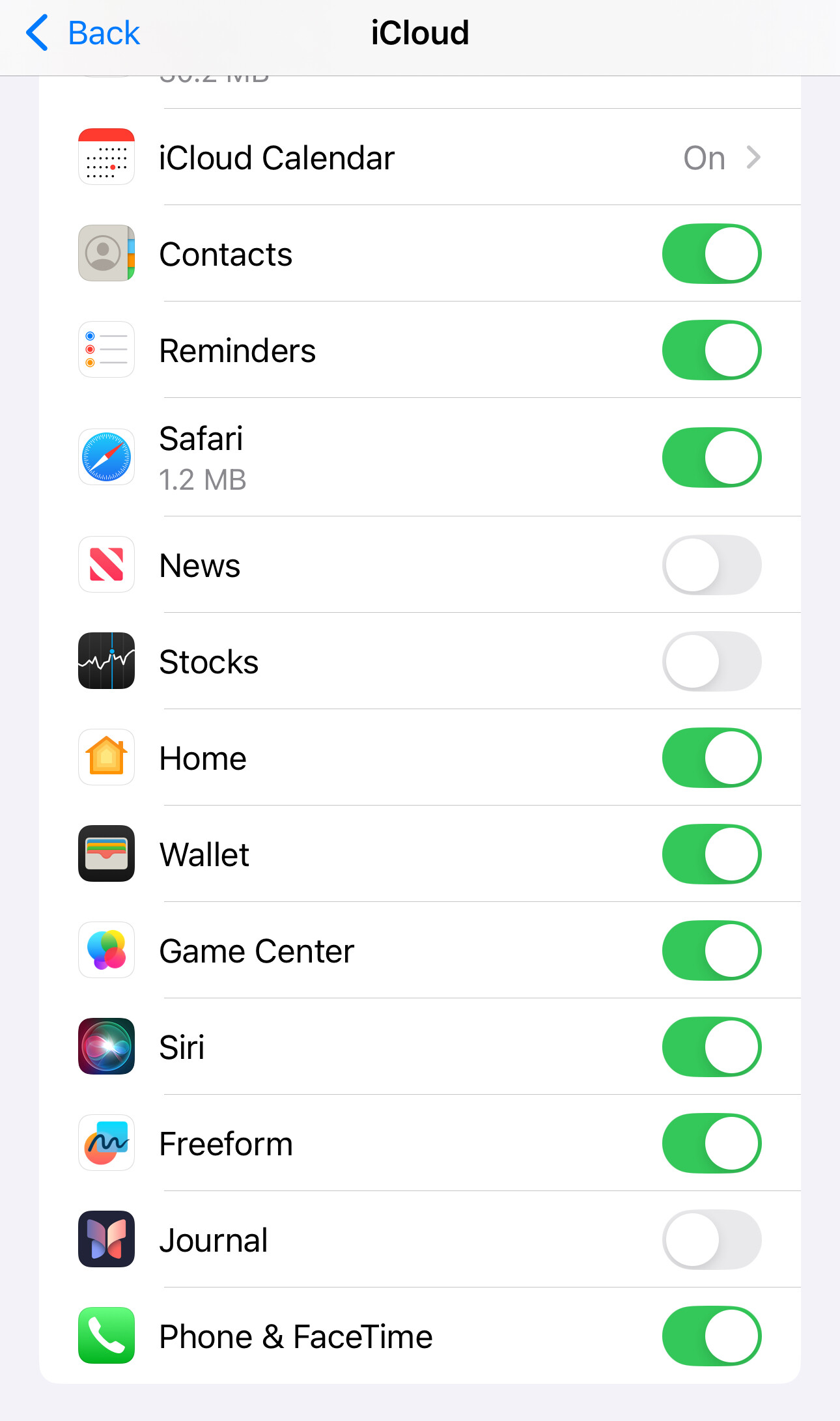
1 Like
Can confirm it’s turned on and that the issue still exists. Sorry I couldn’t bring better news for all your efforts. At least you’ve left an awesome trail of fixes that might help someone else!


2 Likes
as @grahroll says, the options are in the apps. So you need to install those first on an iPhone. I have a 12Mini and a watch 9, myself.
Which phone? And yes, your watch may be too old or perhaps the SE does not allow anything other than cc/dc although I cannot see why it would not.
2 Likes
Deleted.
Thanks, yep I installed the apps and used those to add to Wallet. It only adds on to the iPhone Wallet though not the watch, and no option in the apps to specifically add to the watch wallet. Watch is SE 2 Gen.
1 Like
Yeah,maybe simply an SE issue,since it seems your SE is a current model. Maybe look at updating to a 9 or 10.
1 Like
For people that want a minimalist, ad-free app on Android, check out “Loyalty Card Keychain”. It’s a small download and requires only the most basic permissions.
Thanks, but I went to Play Store to download but it said it was made for an older version of Android and no longer available. It looks like it hasn’t been updated since March 2020 (5 years ago).
Thank you to everyone that added their thoughts on this topic.
I tried Google Wallet, but was unable to edit the card name or icon so it was impossible to differentiate between 2 similar cards (e.g. multiple library cards; or mine and my wife’s Medicare cards.
I have ended up with using Klarna, the Stocard replacement, as it allows editing of the card name; has a basic security check, and I can set it to open up in my cards (ignoring the payment cards feature). It does not allow uploading of your own icons, but apart from that is very similar to Stocard.
2 Likes
Too many advertisements on Klarna to a point that I could’nt use it at a checkout. Too much clutter. I switched to Samsung wallet and am happy with it
1 Like
I use Samsung Wallet for payment cards, Woolies, Flybuys and BP cards. I moved my other cards from Stocard to Catima. The app is extremely flexible with naming options, does NOT ask you to create an account or want permissions to collect data etc. I’ve been very happy with it for various loyalty cards, including an unnumbered local film club membership card, Cinebuzz (Event Cinemas) card, library card and more. It lets you add notes about your cards as well.
Based on my experience so far, I would highly recommend it.
1 Like
Thanks sandy.rigby. After reviewing some articles on Catima I will be transferring all my cards there as I don’t do internet banking. Apparently it has a facility to transfer from Stocard. I’m getting reminders from Klarna that Stocard will be shut down in the next week or so.
For those interested, I’ve pasted the Catima profile from Google Play Store below:
Catima — Loyalty Card Wallet - About this app
Stop the search for plastic reward cards during store or webshop checkout.
Scan barcodes to your device using its camera, forget about cards.
Forget your wallet, or keep it ultralight for valuables.
With this essential everyday carry (EDC) tool you can replace useless plastic with cash.
- Avoid spying with very few permissions. No Internet access and no ads.
- Add cards or codes with names and customizable colours.
- Manual code entry if there is no barcode to store, or it can’t be used.
- Import cards and codes from files, Catima, FidMe, Loyalty Card Keychain, Stocard and Voucher Vault.
- Make a backup of all your cards and transfer them to a new device if you want.
- Share coupons, exclusive offers, promo codes, or cards and codes using any app.
- Dark theme and accessibility options for vision impaired users.
- Made for everyone by the libre software community.
- Localized hand-made translations for 40+ languages.
- Gratis, supported by community contributions.
- Use, study, change and share it as you wish; with all.
- Not only Free Software / Open Source. Copylefted libre software (GPLv3+) card management.
Simplify your life and shopping, and never lose a paper receipt, in-store payment gift card or airplane ticket again.
Take all your rewards and bonuses with you, and save as you go.
Many thanks to Sandy and Consumamon for their info about Catima.
But I have a problem - 1) I have already transferred my cards from Stocard to Klarna. 2) When I open Stocard it tells me all my data has been transferred and deleted. 3) Klarna has no export facility (you can only download activity - which I have tried - no help).
So I do not know of a method of transferring my many cards to Catima.
Does anyone have a suggestion?
Assuming that you requested a zip file from Stocard containing card details …
Import into Catima:
- Open the Catima app.
- Navigate to the “Import/Export” section (usually found in the menu).
- Select the Stocard .zip file from your device’s filesystem.
- If the .zip file is password-protected, Catima will prompt you to enter the password.
- Catima will then process the import, adding your Stocard cards and codes to your Catima wallet.
(source)
1 Like
No I did not get a zip file from Stocard - the transfer into Klarna was ‘automatic’ so to speak.
1 Like
