I have noticed recently that Windows is forcing us to transfer to what they call ‘New Outlook’. I have found that if I try to open an email now on my computer it will not open until I transfer to New Outlook. Likewise when I click on Choice’s email link in their website it defers to New Outlook and will not allow me to progress without transferring everything to ‘New Outlook’. I got around this by typing in email addresses into old outlook rather than clicking the link in company websites.
Unfortunately, I cannot now open emails that I had previously saved on my computer because Windows says I need to convert to the New Outlook.
Presumably like many others that use Outlook, I have concerns with this change. I know nothing about the New Outlook, why the change has been implemented and what are the consequences and risks of making the change. I am on a ship at sea for the next 4 months and rely on emails for my only communication via the ship’s Wi-Fi. I am especially concerned that if I agree to transferring to New Outlook it may cause problems and I may lose my ability to communicate while at sea. On the other hand, it now means I cannot use my email records saved on my computer.
I consider this is terrible consumer service. We are being forced to do something by a company without any information or real support for consumers that have come to rely on the product.
I have asked Choice to investigate this and provide a report which I am sure would be of interest to many. In the meantime, I would appreciate any advice ‘tech experts’ can provide me on what I should do now.
I think you may be referring to what was also termed the Mail and Calendar app in Windows if you were clicking the little envelope symbol on the task bar or if the default app for Windows for mail was set to that app. It may also be the Outlook that was included with Microsoft 365. Now it is being replaced by a newer Outlook that has Copilot as part of its features.
This new version is being installed as part of Windows 11 versions since the Windows 11 2H23 release (October 2023 release). Usually there is a toggle available in the older apps to switch to the new version, it has at times been missing or broken but should be working now. Once you switch you will see a Copilot blab in an email you create. It can safely be ignored if you don’t want Copilot to help produce an email (I ignore it as my preference). This changeover will become permanent soon, if not already changed over.
First, don’t panic. You won’t have lost your emails. It’s just a matter of getting around the persistent demands to switch to the ‘new’ Outlook.
To confirm the situation (tell me if I’m wrong on any of this):
You’ve been using the ‘classic’ Outlook (rather than the free ‘Mail’ and ‘Calendar’ apps that used to come with Windows and have now been replaced by the ‘New’ Outlook).
You have a lot of saved email, either within the old Outlook, and/or as .PST archive files, and/or as individual message files (usually files with a .msg extension).
Suddenly the “Outlook (New)” app is the default for email links (on web pages and in emails) and for opening saved email message files (*.msg).
You’ve been able to work around the link issue by opening the old Outlook and copying and pasting the links into it.
So it sounds like the old Outlook app is still installed, you can open it, and it’s working (at least to send emails).
When you say that (with my emphasis)
How have the emails been saved? Are they in .PST files, or individual message files? Or do you find when you open the old Outlook that you can’t access previously-stored email?
If you go to the add/remove programs you can remove the new outlook** and the system will revert to the old application
** it will keep reinstalling when updates are applied
Just to make life with Outlook (New) hovering in the wings more ‘interesting’ … the latest MS 365 automatic update
Opened Outlook (New) when I clicked my Outlook (Classic) icon , but gave me the option to go back to Classic temporarily (?), which I immediately did
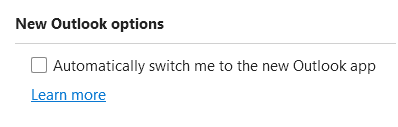
But then I found it had added a “New Outlook options” section at the bottom of Outlook (Classic)'s File > Options > General and turned the option “Automatically switch me to the new Outlook app” on:
It had also changed a number of typing / formatting settings in File > Options > Mail > Editor options… back to MS’s default (eg, replacing double quotes with ‘smart’ quotes).
There might be other option changes I haven’t noticed yet.
So be warned! This will happen to you if you have MS 365 (which updates itself silently behind the scenes).
Microsoft is on a roll coercing Windows users to embrace their new world order. It is not just Office 365.
Microsoft is ‘retiring’ Skype and moving the chat function to ‘Teams’. For those who have used subscription features of Skype (outbound calling and inbound phone numbers) the soft phone will supposedly be integrated into Teams before 5 May on some magical date.
Two decades ago Microsoft sold Money, an excellent budgeting, banking, financial application. They retired that and forced the users base onto the Intuit Quicken application (or to fend for themselves finding something else).
A message is Microsoft is nether respectful nor supportive of their consumer base that provides insufficient profits, so they are consciously moving everything they do toward commercial customers. It it increasingly time to move on, but linux is still not for everyone, and not all applications run on it - like Quicken - and emulators for linux are hit or miss.
In the interim one can delay the pain by migrating to open source or third party apps, not trying to outguess Microsoft ‘wizards’ of subterfuge.
Unfortunately, I’ve become accustomed to using several functions in Classic Outlook that aren’t and probably won’t ever be in New Outlook, and that don’t exist in any of the alternative apps either. Without those functions I would find it much harder to manage my email.
I do keep checking alternatives every so often, so far without success.
 , but gave me the option to go back to Classic temporarily (?), which I immediately did