Digital scams to look out for

I think it helpful to have a topic specifically for details of digital scams of any kind that you’ve read about or have seen personally, to have them all in one place for easier reference.

By “digital” scams, I mean pretty much any phone, email, or online scam aiming to trick people into revealing personal details and/or account login credentials, whether verbally to a phone caller, or by going to a malicious website, etc.

Here’s an apparently quite convincing Google Mail scam now doing the rounds:

Note:

Maybe the biggest tip-off was that Google support (or any other tech support for that matter) will not contact you out of the blue to tell you there’s a problem.

8 Likes

I received an email from Ray White Real Estate saying to be aware there is currently an email purporting to be from Ray White asking tenants to change bank details.

6 Likes

Thanks, @deb2.

A lot of phishing emails have become very sophisticated, and they’re helped along because many people have developed the habit of clicking on links … because so many genuine emails they receive invite them to do so.

For example, the CHOICE emails I receive about CHOICE Campaigns turn up at odd intervals (ie not in direct response to something I’ve done), come from an email address that isn’t at choice dot com dot au, and invite me add my name by clicking on URLs that are not in CHOICE’s DNS domain. I’ve become used to those, and now know that this other DNS domain is valid … but I also have to remind myself to check before clicking. It’d be very easy to create a phishing email that looks identical to a valid CHOICE email that the recipient would click on without thinking.

I hope the Ray White email you received was a responsible one that doesn’t invite the recipient to click on any URLs.

7 Likes

I have always had a motto when someone calls, or sends a text message and or email, I will call the proper phone number and or login to my actual account, better to be safer and sorry.

1 Like

I keep getting my.gov scam emails, the links are preposterous such as this one
my gouwv lap @ TennantLLC . onmicrosoft . com (I added the spaces to prevent the link from working)
Just look at the spelling.
I have reported many of them but they still keep coming.
I never click on any url’s in any messages because of how rampant it has become.

8 Likes

Welcome to the community @CharlesM
Looking forward to seeing you in the forum again soon.

3 Likes

Helpful advice from the CommBank about cyber security:

Cyber Security Awareness Month October 2024:
4 ways to help keep you cyber secure

Australia has an ambitious goal to become a world leader in cyber security by 2030.
A large part of that is making sure Australian organisations and those that live and work here understand the steps they can take to make themselves more secure.
This October, CommBank is joining forces with Australian organisations from across a range of industries and Government to highlight four key actions to take across the month that can help make you and your organisation more secure.

Week 1: Activate Multi-Factor Authentication (MFA)

The first message for the month is to activate MFA wherever possible. MFA is an additional layer of security that acts as an additional barrier to an attacker in the event your password is compromised.
Passwords can be compromised in any number of ways.

  • We can be tricked into accidentally giving them away by a phishing email that takes you to a fake login page that harvests our username and password.
  • A database containing our password information can be stolen from a service we use.
  • With a cybercrime reported every six minutes in Australia2, it pays to take the time to switch on MFA, especially for critical services such as email.
  • Watch a video on MFA
  • Read the article Understanding MFA

Week 2: Apply automatic updates to all software

Software updates are more than just functional improvements – they’re crucial for your device’s security. These updates often include patches for vulnerabilities that attackers can exploit. By enabling automatic updates for your device, operating systems and applications, you help protect your systems from potential threats.

Week 3: Avoid password re-use. Use passphrases

30% of small businesses have upgraded passwords to passphrases3. That’s according to the Council of Small Business Organisations of Australia (COSBOA)’s Cyber Wardens program.

That means there is still work to be done. Passphrases are a good idea because passwords are often simple to guess and quick for computers to break.

The temptation is also often to re-use passwords or use passwords that are linked to something or someone special to you. Below is a video that shows how that makes it easy to break passwords.

The goal of a passphrase is to create something that’s easy for you to remember, but hard for a computer to guess. A nice approach is:

  1. Pick 4-5 random letters eg. RKEB
  2. Think of a word that starts with each letter eg. RosyKoalaEggyBread
  3. Add some numbers or characters if you like eg. RosyKoala&2EggyBread
  4. That’s your passphrase!

Week 4: Ask “Is this a phishing email?”

Phishing emails are a common vector of attack used to trick people into giving away sensitive information, including passwords and login details, or downloading fake apps or malicious software.

Whenever you receive an email that looks or feels a bit odd or unexpected, remember to Stop, Check and Reject.

We can all play a part in shutting down cyber criminals. For the latest scams targeting customers, search ‘CommBank Safe’ on the CommBank website.

1 Australian Government Department of Home Affairs, 2023-2030 Cyber Security Strategy, November 2023.
2 Australian Government, The National Office of Cyber Security, August 2024.
3 Cyber Wardens Research Report, March 2024.
3 Likes

The ToxicPanda Android trojan is nasty.

Fortunately, it poses a risk only to those who ‘sideload’ apps to their device – and aren’t careful enough about where they get those apps from.

The trojans are made to look like the Chrome browser, banking apps, and other popular apps, and the victim is lured into downloading them from sites other than the Google Play Store, reputable third-party app stores, or reputable developer projects on sites like SourceForge and GitHub.

This is a specific reminder to those who sideload Android apps: be very selective about where you get them from.

And advice to everyone else: only install apps from the Google Play Store or reputable third parties like F-Droid, Aurora Store, and APK Mirror.

Avoid those links that beg you to “Download our app!” on any site. If it’s a reputable app, it’ll be on the Play Store. If you really want it, get it directly from there.

4 Likes

This school has the right idea: teach children to spot scams.

Critical thinking is an essential protective mechanism in today’s world. It should be a mandatory school subject, starting early.

I hope we see something like this introduced into all schools.

5 Likes

Using AI to scam the scammers!

Daisy is so lifelike, as her creators explain, that she has successfully conversed with numerous fraudsters for 40 minutes at a time.

2 Likes

I have one at home, not called Daisy though, mine is all natural and required no additional training.

4 Likes

My home has a Victor Meldrew quite happy to answer cold callers. Or suspected scammers.

1 Like

Deepfakes are becoming a major issue, and “people are warned to be extra-sceptical as they scroll” – but that’s about the extent of the advice available so far.

In short:

Health professionals are being impersonated in deepfake videos promoting dietary supplements for the treatment of type 2 diabetes.

Health experts are concerned the fraudulent ads may lead people to stop taking their medication.

What’s next?

Facial recognition technology is being trialled to identify potentially fraudulent AI-generated content. In the meantime, people are being warned to be extra sceptical as they scroll.

About all consumers can do in the meantime is follow the same principles as with phishing emails / cold calls: seek the real source if possible, and/or look for supporting evidence – in this case, on trustworthy medical reference sites.

This might be a good start on finding such sites.

2 Likes

From CSIRO, more about deepfakes, and some good advice about avoiding scams:

And, as they point out,

Education is your best form of protection

Ultimately, awareness and proactive protection are key to staying safe online. Educating yourself about cybersecurity is your first line of defence against scams.

Stay safe, everyone!

1 Like

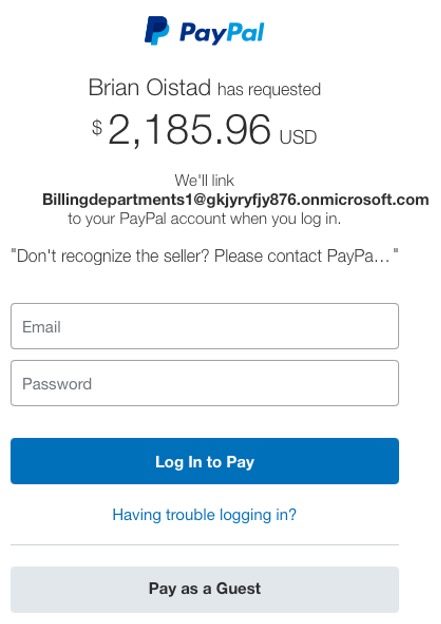
WARNING: be wary of all unsolicited emails, regardless of where they appear to come from. This scam is probably aimed more at businesses than at individuals, but it’s very sneaky and can bypass standard phishing filters.

The scam uses a combination of PayPal’s ‘request payment’ and ‘link email address to account’ functions and Microsoft’s free MS 365 test domains to compose emails that come from a valid sender (PayPal) via a valid mailing list address (in an MS 365 test domain), and link to valid PayPal URLs, making them seem legitimate.

The “Pay Now” link in the email will take the victim in to a genuine PayPal page – which is not the confirm-payment option. It’s Link another email address to your PayPal account, and is providing the hacker’s mailing list email address to be linked to the victim’s own PP account.

Once the victim signs in, the hacker has access to their PayPal account via the now-linked email address, and can take over the account.

The best protection against phishing is – never click on links in unsolicited emails. Some security experts are even saying don’t click on any links in email, solicited or not.

What one should do, when receiving a request for payment that one does not recognise, is ignore all links in the email and go to PayPal’s normal login URL via a browser or PayPal app to check the account.

2 Likes

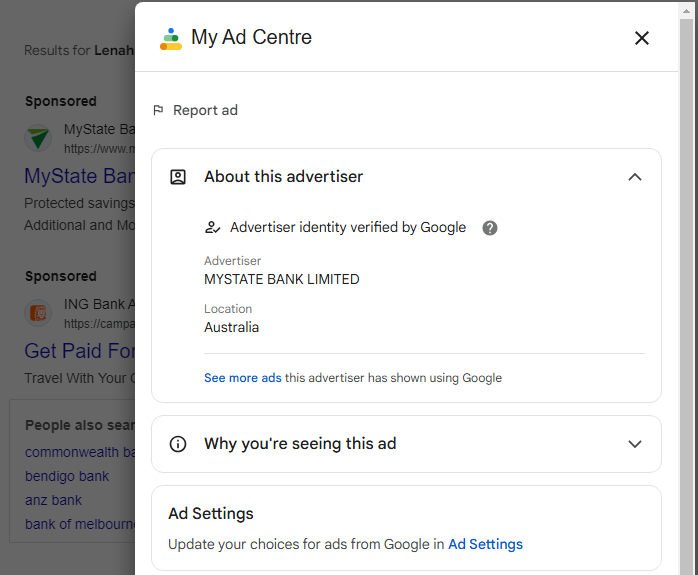
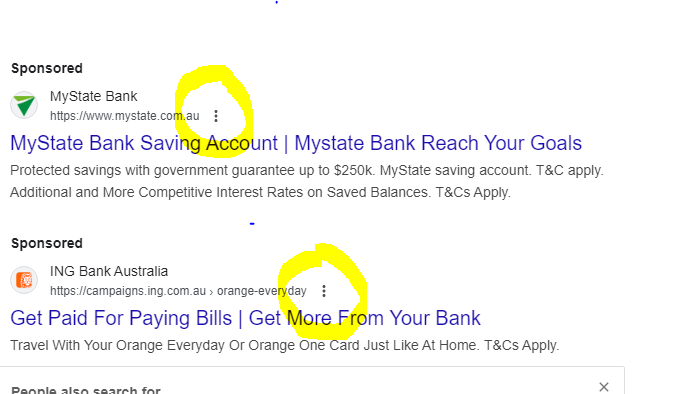
Another scam/phishing method we have recently become aware of through a business we deal with is criminals are creating fake Google Adwords listings for searches of common business accounts. These search result pages display an advert that genuinely looks like the business being searched, however, clicking on the adverts/sponsored links takes you to a fake login page. It’s from these fake (phishing) login pages that criminals are able to then obtain your login credentials, should you enter them in.

It is also possible to check who the advertiser is by clicking on the three dots to the left of the sponsored link heading:


which then has a popup window with information, such as:


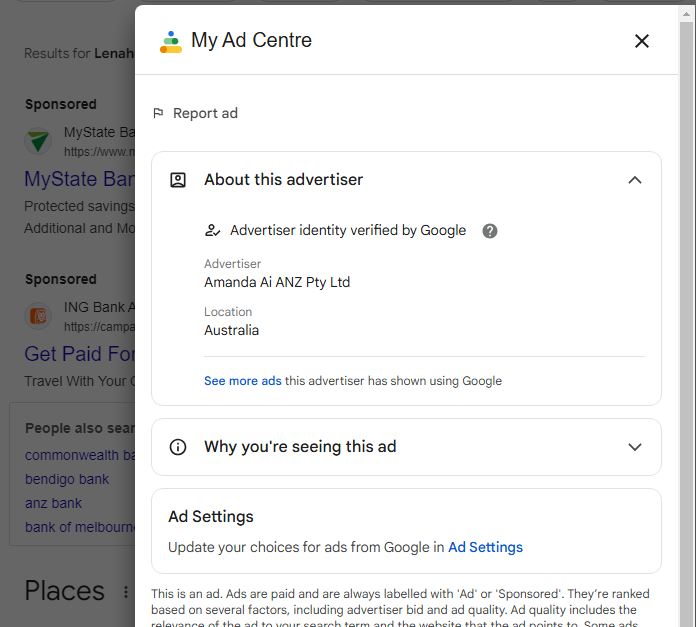
This can provide information to whether the link is genuine or not as the advertiser’s name may be different to the business name.

However, this isn’t always foolproof, as a business may use another entity as the advertiser, such as ING which shows the advertiser as:

The advice provided by the business in question is one should avoid clicking on adverts/sponsored links as it is possible that it may take one to a fake business page.

Where one has an online accounts, it is best if one bookmarks the genuine business page (through a browser or in a password manager) and only use the genuine and stored website addresses when accessing websites. Never click on links from adverts/sponsored links.

3 Likes

As with email, be wary of unsolicited text messages, and do not click on links in or take any action requested by such texts.

There’s been a rise in unsolicited SMS texts encouraging users to reply “Y” to re-enable links in the message – this is aimed at Apple iMessage’s built-in phishing protection, which automatically disables links in texts from unknown sources.

… these smishing texts, and others seen recently, ask users to reply with “Y” to enable the link.

“Please reply Y, then exit the text message, reopen the text message activation link, or copy the link to Safari browser to open it,”

If they do so, it re-enables the links and turns off iMessage’s built-in phishing protection for this text. Even if they don’t then click on the re-enabled link or copy to the browser as requested, just the act of replying identifies this phone number as one that will react to phishing texts, thus making it a target for further phishing.

This tactic has become common over the past year, and because genuine businesses and services often send texts with requests to type STOP, Yes, or NO to confirm appointments, opt out of text messages, etc, many people will do as requested. :worried:

2 Likes

YouTube account holders do occasionally get valid emails about features and updates. This phishing scam emulates that type of contact. If you have a YouTube account, be wary! [If you don’t have an account, ignore anything that seems to come from YouTube, anyway …]

… users will receive an email from an official-looking email address “no-reply@youtube”. Users are requested to click a link that will lead them to a YouTube page with a private video. In the description, users are then instructed to check a link, which leads to a password protected DocuSign page.