Protect ourselves- scam phone calls, text messages, emails, including tax scams

What is one to make of this on Facebook?

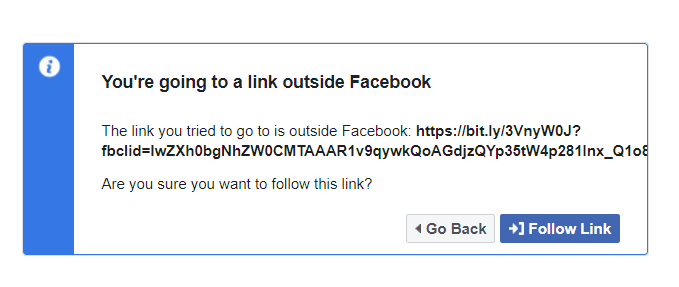
A new CHOICE report reveals four out of five scam victims received no warning before transferring money to a scammer. Read more: https://bit.ly/3VnyW0J

I know about bitly, but how about others? Would this at face value seem suspicious? Would you click on it?

The CCTLD .ly is Libya.

2 Likes

It is worth noting that the two-character ‘country codes’ simply indicate which country owns that ‘Top Level Domain’ (TLD). Because the TLD is short and (can be) catchy (think “.me” and “.io”), and because countries, especially small ones, can and do sell subdomains within their own TLD to anyone who wants them, URLs within a TLD do not necessarily have any association with that country.

Some good advice and tips here: https://safecomputing.umich.edu/protect-yourself/phishing-scams/shortened-url-security

To summarise,

  • Before clicking a shortened URL, check the full URL. Many URL shorteners include a preview mode. Eg, for bit.ly and goo.gl, add a “+” at the end of the URL. For tinyurl, add “preview.” between the // and the body of the URL.

  • Use a URL checking service. There are sites where you enter a short URL and it’ll show the full URL. Here are two common ones:

    • unshorten.it - this not only translates the short URL, but attempts to provide a ‘trust rating’ for the site, and tries to show a screenshot. If all you want is the full URL, use urlxray.
    • urlxray.com - this one just translates the short URL. Simple, quick, and easily readable.

Note: aka.ms is Microsoft’s own short URL domain. It doesn’t seem to have a preview mode, but you can consider aka.ms links to be equivalent to microsoft dot com.

For more information about URL shortening, and a list of some common URL shorteners, see

2 Likes

From: (https://cyber.gov.rw/)

How do you check if a shortened URL link is safe

A URL (Uniform Resource Locator) is an address for a given unique resource on the World Wide Web. URLs makes it possible for internet-connected devices to locate and open web pages on the Internet. Institution websites, ecommerce platforms, social media networks etc. all use URLs to direct stakeholders to their web pages, an example would be https://www.cyber.gov.rw, the URL of the NCSA website.

While URLs are clear in their destination, malicious actors will leverage shortened URL links to infect people’s devices with malware. As the full URL is not revealed, it is easy for cybercriminals to hide dangerous content behind the bait of a short link.

Friends and family can unknowingly pass on unsafe links through email, social media posts and instant messages. In order to protect yourself, adopt best practices that allow you to check the safety of any shortened link before you click it.

1. Hover over the link

Use your mouse cursor to hover over a link and see the full URL of the link’s destination in the lower corner of your browser. For MAC users, to enable this tool, go to View and then select Show Status Bar. The URL-peeking status bar should now appear at the bottom left of the window any time you hover over a hyperlink on the web page.

As an example:

Hover over the links below to see that both these links connect to NCSA’s homepage, you would not have been able to know that without hovering.

short.ly

bit.link

It is important to bear in mind that this best practice should not be considered as 100% reliable as malicious actors can write code that dynamically changes the destination of a link just as it is clicked. It is best to combine this best practice with other techniques for the safest results.

2. Copy and paste the link into your browser URL address

In addition to hovering over the link to display full URLs in the corner of your browser, right click on a link you are uncertain of, click on ‘copy link address’ (or your browser’s equivalent). Then right click on your browser’s URL address bar and click paste.

This practice allows you to see the true target or destination of the shortened link. It is important here to not click ‘past and go’, as the aim is to display the true target destination that you would not have seen through the shortened link, not to visit the site before it is verified as safe.

3. Use a URL checker

URL checkers are tools that scan shortened links to see if they redirect to fraudulent or malicious sites. Some examples of URL checkers that can be used are:

A simple google search can provide you with various options to choose from, where you can then find your choice of preferred URL or safe link checker.

4. Preview shortened links

Some of the more popular link shortening services allow you to see a preview of the link destination through their website by adding certain characters to the shortened links in your browser URL address bar.

Type the shortened URL in the address bar of your web browser and add the characters outlined below for these two examples to see a preview of the full URL:

Between the “https://” and the “tinyurl,” type ‘preview.’ and hit enter.

Example: https://tinyurl.com/4wkmhpzt becomes https://preview.tinyurl.com/4wkmhpzt to view a preview of the true link destination.

At the end of the URL, type a + and hit enter.

Example: National Cyber Security Authority | How should you store passwords safely? becomes Bitly. The power of the link. to view a preview of the true link destination.

1 Like

@isopeda apologies didn’t check before posting. They say great minds…:joy:

Anyway, I think we can never have too much information to protect ourselves. :pray:

1 Like

This works in browsers, and also in some email client apps.

However … MS Outlook (or rather, the MS email server it’s talking to) rewrites both incoming and outgoing URLs to redirect them via safelinks dot protection dot outlook dot microsoft dot com, which is intended to check them for nasties (but doesn’t catch them all) - and it also makes them very hard for the user to interpret.

For example, this is what shows on hover in Outlook’s reading panel over your username in the email notification from the Community (URL modified so this isn’t just turned back into a link):

https colon //apac01 dot safelinks dot protection dot outlook dot com/?url=http%3A%2F%2Furl3006.choice.com.au%2Fls%2Fclick%3Fupn%3Du001.S4d4CjZivP5Vh0vErq4ubrrQfHGl5m5i3p2jKJ0EOkRWucnTFbZ6oayBY6GypnlzffjA_4tDQNTfkbbUcWUGVkood-2F0q0-2BrO-2FcchAikjOCyws5Xi3QBeNJcx-2FQEdk-2BhPQMQh3QydM-2FcTbkwPIod5PYoUHyXF9vR1Deqg5FjDaP-2BSu7TGGI4SW8OfOn3rIS4xWnxQ3epWVYytQ0-2FIOqtMd8xR9odZO13cISHxcv9hnN0AvvghZKiaEXrR-2FR-2BSsfmAcX9Ut1lVnZtj3utXzwO1-2F6y-2Fql6ht-2FQrEe-2Flf5N4uc-2Fue2Pk-3D&data=05%7C02%7C%7Cdb2b70e1e7f04566891808dc81c17ea8%7C84df9e7fe9f640afb435aaaaaaaaaaaa%7C1%7C0%7C638527915275304025%7CUnknown%7CTWFpbGZsb3d8eyJWIjoiMC4wLjAwMDAiLCJQIjoiV2luMzIiLCJBTiI6Ik1haWwiLCJXVCI6Mn0%3D%7C0%7C%7C%7C&sdata=VOUG6EPSYXk%2BHORfQqUUUjw6NvKNc7tXOQc3bX6SDoc%3D&reserved=0)

Once upon a time, the hover would display “Original link:” and the actual URL (while the status bar at the bottom of the Outlook window showed the full rewritten address) and that was very useful. It doesn’t do that any more, and I haven’t yet found an option that can change the behaviour. :worried:

1 Like

I think my point has been demonstrated about links using shortened and/or non-standard URLs. Try explaining the posts by @isopeda and @Gaby to a non tech savvy user as to whether or not to trust the link to click on.

The link is safe, and leads to the Choice website for an article to read, but one would never know that unless going through the technical process of checking. Something most user would simply not do.

Yes, indeed. Been there, tried to do that.

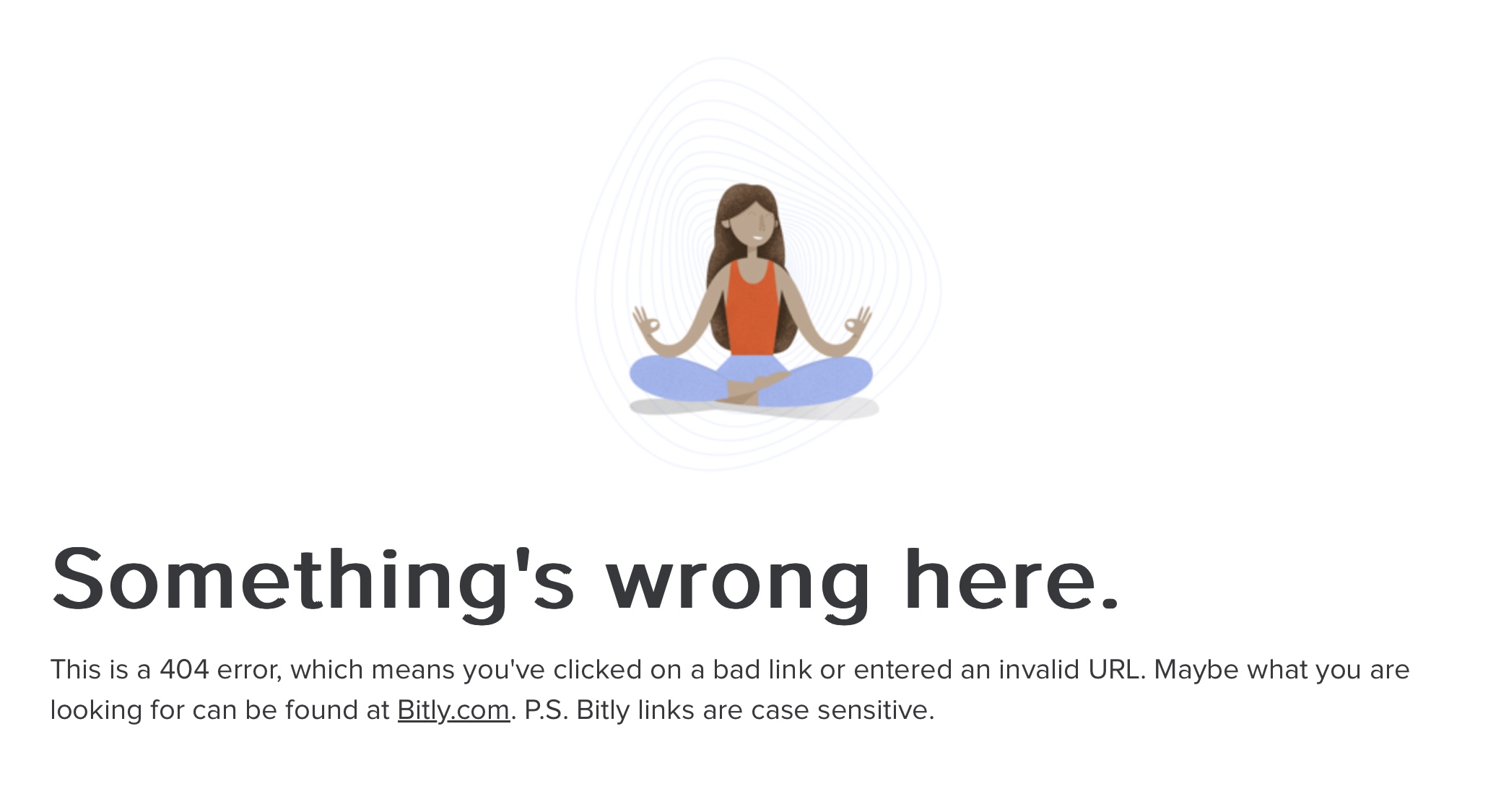
When I click on that link you gave in your previous message, what comes up is this:

It’d be nice if Facebook had translated the short URL.

1 Like

Really? You are sending us to a site in Rwanda with links?

1 Like

It won’t bite you, it’s useful just the same.

This is what I get from your link:

2 Likes

That’s strange. When I click on the link I posted either from Facebook or Choice Community, I get this. My browser is Chrome.

But maybe I am old fashioned with noting the ending part of URLs. If I see .ly, I think Libya. If I see .rw, I think Rwanda. If organizations want to play silly games with the CCTLD part of a URL, then I am not amused.

1 Like

Mine is Safari. :woman_shrugging:

Ah well, you use a computer environment that is totally alien to me.

It’s great advice.

To note a great many users, likely the majority neither hover nor right click. There is no hover available on a smart phone or tablet device. Holding a tap may or may not bring up further details of the linked web address. It is device and app dependent.

A further observation is it’s common for those less familiar with tech, who have not grown up with tech to spin out at the slightest need to do more than tap or click as per habit. We will be familiar with those of our friends who go into a cold sweat if asked to do any maths from proportioning 25% to converting grams to kilograms. A similar condition to that commented on navigating tech.

Do we need to start with better understanding the lowest common denominator and to consider how any solution assures their security?

2 Likes

From one of the links above:

Australians lost $2.7 billion to scams last year, most of it stolen from older people. The 2022 numbers were worse – $3.1 billion spirited out of our bank accounts and into the pockets of scammers.

These are colossal figures by any measure, so it stands to reason that deeply resourced businesses like banks, telcos and tech platforms should know how to prevent scammers from infiltrating their services to pull off these fraudulent transactions.

There are two connections that I cannot make here.

  1. Why does the size of the problem lead to the conclusion that the owners of the systems know how to fix it and can?

  2. What is this infiltration that ought to be prevented? That sounds like the systems are open to fraud, that they are compromised and subject to attack from unauthorised persons.

I thought the major problem was not that the systems were being attacked directly allowing unauthorised payments to be made (although that can happen) but that account owners were making payments, properly authorised, that were not what they intended.

It isn’t the infiltration of the account that is the problem but the mind of its owner. Why is the organisation responsible for all of that?

Before anybody gets upset that I am victim blaming, I do think banks should be more proactive and that they can and should do better, it is too easy for account holders to make irrevocable mistakes. But I ask you to examine the logic of the explanation of the problem given above and consider if it is fair to all.

3 Likes

That is true, and scams such as remote access scams are on the increase. It is the victim knowingly providing access to their computers/bank accounts, not realising they are being scammed. This allows scammers to bypass most security measures which are in place.

I don’t know how to prevent such scams, and ‘deeply resourced businesses like banks, telcos and tech platforms’ won’t know how to prevent scammers from persuading their customers to provide access by bypassing most security systems. They could ban online transfers, purchases or transactions to prevent fraudulent transactions, but this would cause enormous disruption to almost all consumers and businesses.

I feel that online access, which is relatively new (about two decades), has occurred quickly without those using it understanding the risks. Risks are very different, especially for those who have experienced the old way of doing things. Maybe the older generations haven’t fully appreciated these new risks and in someways are still transacting believing it isn’t dissimilar to the ‘old way’.

Technology has also allowed criminals to enter our homes in a different way. One feels safe at home, and this feeling of safety makes falling victim to scammers easier. One wouldn’t let someone who is unknown, knocking at their door, purporting to be something…to hop on their device/computer to fix something. Likewise they would be unlikely to transfer money because a door-knocker asked one to. Being safe at home somehow allows ‘technology door knockers’ to access the home, when a physical door-knocker wouldn’t . 'Technology door-knockers ’ should be treated the same way.

2 Likes

I am going to be blunt here.

Sometimes no amount of warnings about scams in media articles, and safe online practices, and the dangers of online shopping from dubious overseas sites is going to work.

Sometimes some people just need to be scammed for real to learn the lesson.

Maybe online facilitators like banks and telcos can have checks and money transfer limits in place to limit the damage when it occurs, and it will, but a person that learns in real life will loose the complacency and the ‘oh that only happens to other silly computer users’ attitude quickly.

1 Like

Perhaps the first step is for warning articles to stop treating the matter as one problem with one solution. We are often hit with aggregate numbers about how many people lost money or the total money lost, which obscures that here are several models in use.

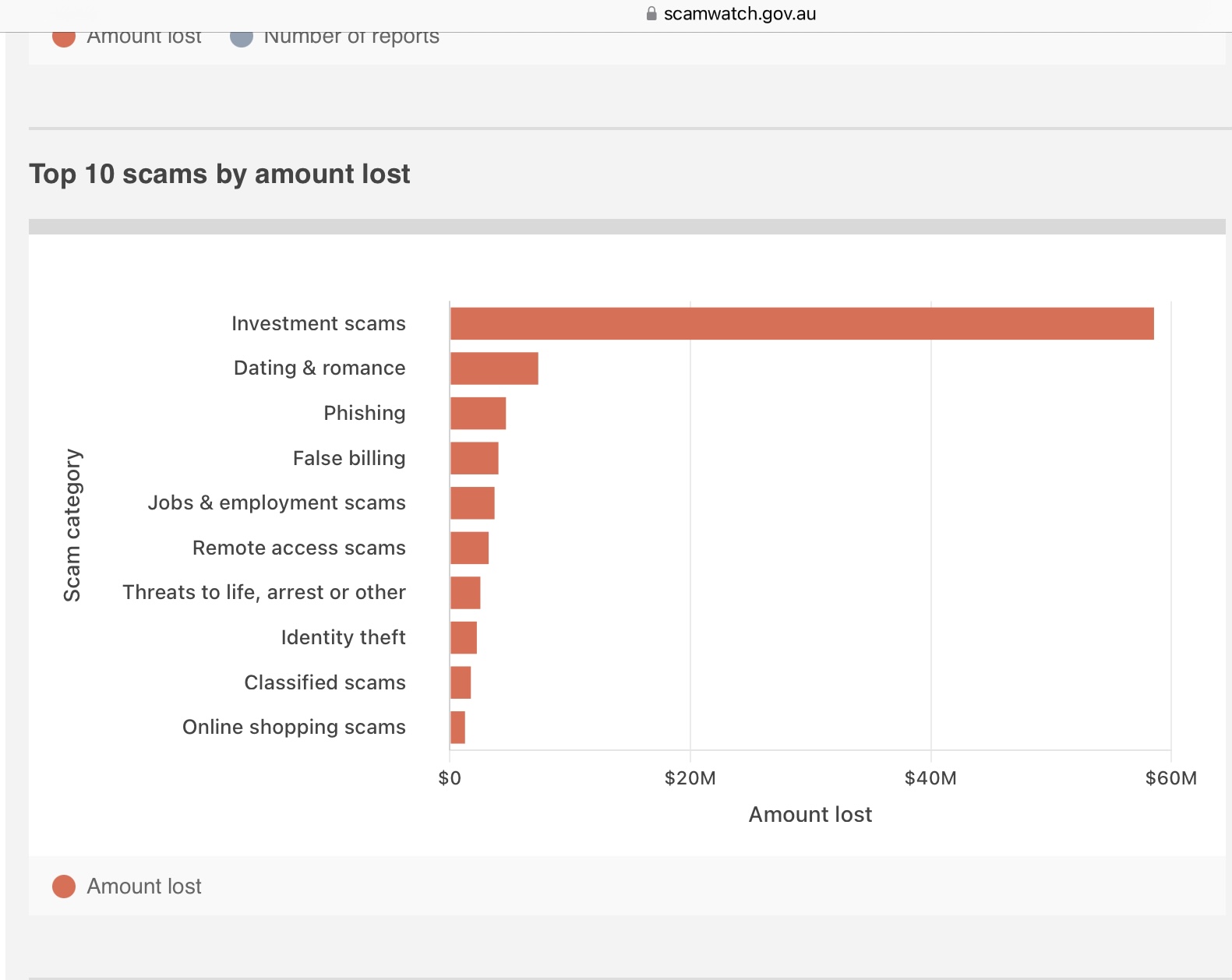
There are the quick hits that gets a little money or some saleable details, these are the bulk of transactions and broadly what the title of this thread describes. Then there are the long cons, where the victim is groomed over many contacts to send substantial sums of money to a ‘lover’ or to invest their life savings in non-existent financial ‘opportunities’, which number far fewer but take most of the money.

Conflating the two and a thinking that they have the same solution only adds to the confusion.


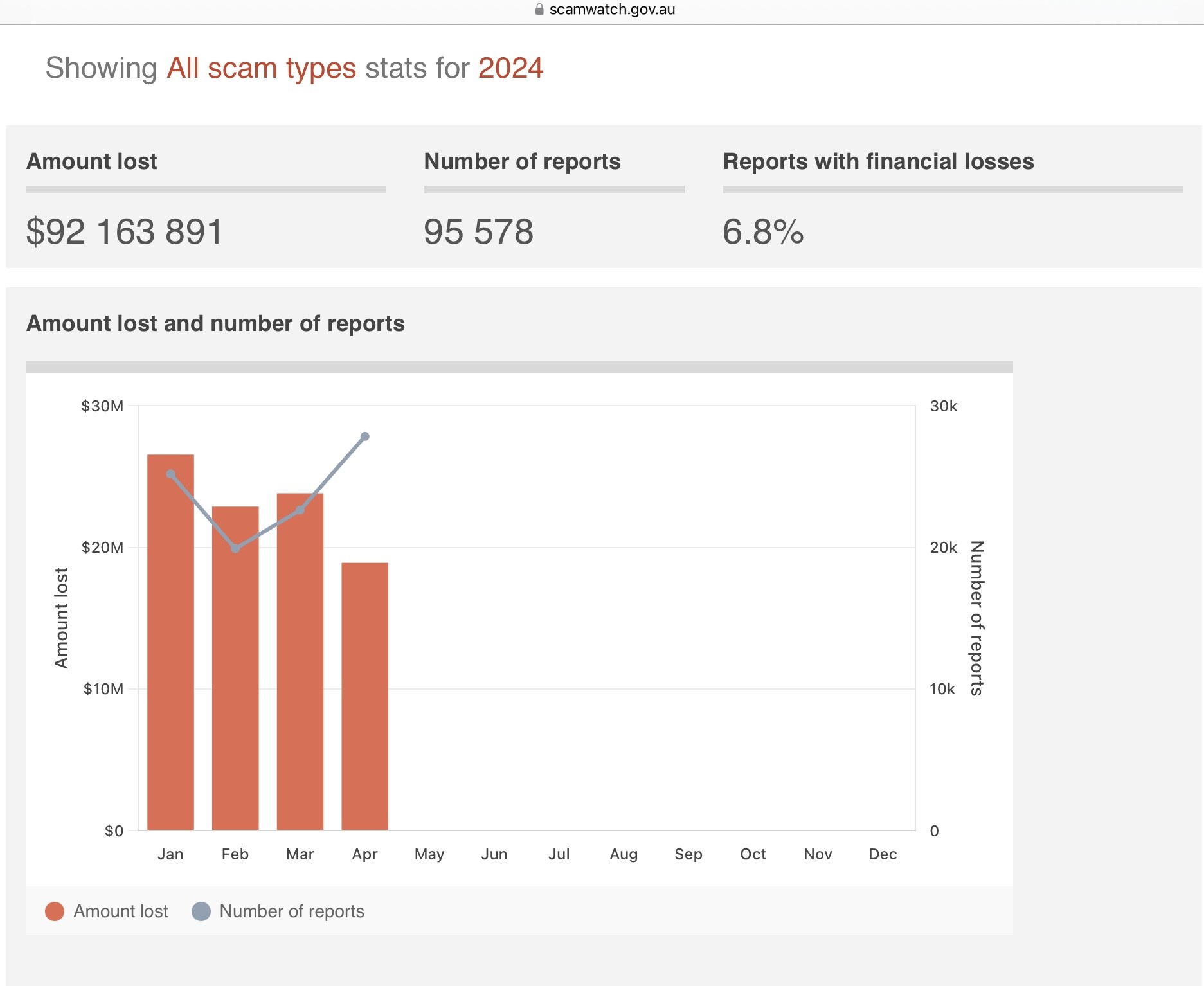
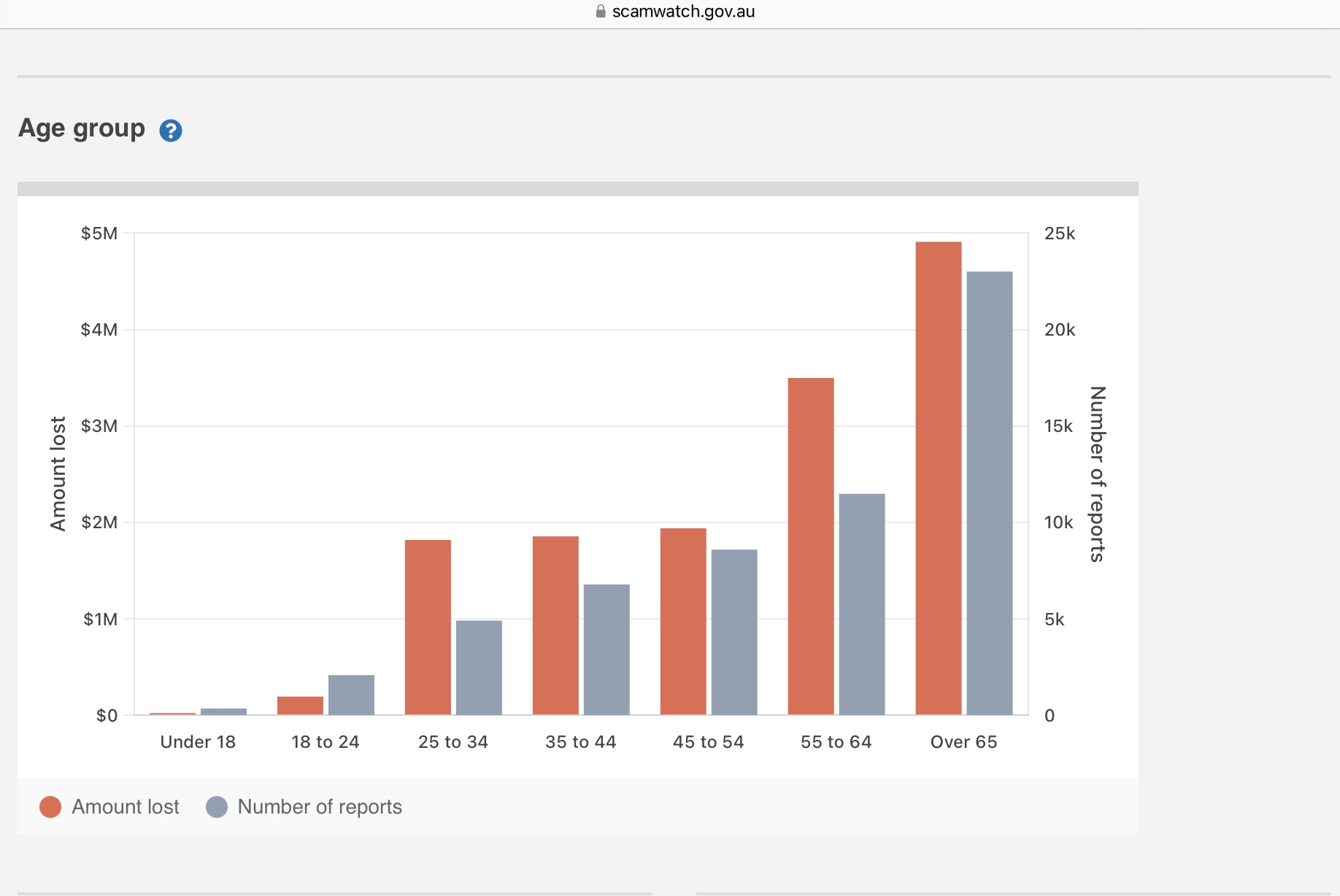
This scam stat is just for the 1st four months of this year! It’s a huge amount lost and it clearly shows that the biggest loss is in investments scams and that the over 65’s age group are the most vulnerable and lose the most amounts to scams.
If there was an easy solution the problem wouldn’t exist.
Knowledge always helps and often leads to a reduction of victims in any theft/fraud scheme.
Easy to find faults with what others put forward, after all this is only a community forum..let’s keep positive and input some helpful tips/ warnings/ ideas :slightly_smiling_face:

1 Like

You can look at that several ways. One is the age factor is because the older are often less tech savvy, the other is that they are looking for retirement investments.

Investment scams may utilise tech to hide their identity, whereabouts and to present false data but they have been around since Adam was in short pants without that assistance. If the scammer gains the victim’s trust all the computer checks and balances in the world will not stop people giving them money because the victim wants to do it.

Two different problems, two different kinds of solutions and education required.

Hmm … I’ve since discovered that it’s doing the right thing on some messages but not others, and haven’t spotted a pattern. Could be a bug in my version of Outlook 365.